Why I hide a new website from Google until launch day
How to stop Google indexing a staging site before launch: the noindex and canonical setup I use, why it matters, and the launch day cutover checklist.
You have been sent a link to your new website. It works, the pages are all there, you have clicked through every one. So you type your business name into Google and nothing comes back.
That is deliberate. I stop Google indexing a staging site on purpose, and switching that block off is the last thing that happens on launch day, not the first. A site found early, at the wrong address, makes a mess that takes months to clear. Here is what I do, why, and in what order.
What noindex actually does, and what it does not
A noindex tag is an instruction in a page's HTML that tells search engines they may read the page but must not list it in search results. It does not hide the page from people, it does not block access, and it does not stop the page being fetched. Google still downloads the page. Google simply declines to list it.
Three controls get muddled together here, and the difference between them is the whole subject:
- Crawling is a search engine fetching your pages. Governed by robots.txt.
- Indexing is a search engine listing a page in its results. Governed by a noindex tag, set as a meta tag in the head or as an X-Robots-Tag HTTP header.
- Canonicalising is telling a search engine which URL is the real one when the same content sits at more than one address. Governed by a canonical tag.
Google's Block Search indexing with noindex documentation adds the condition that ties them together: for noindex to work, the page must not be blocked by robots.txt.
Why a half-finished site can outrank the real one
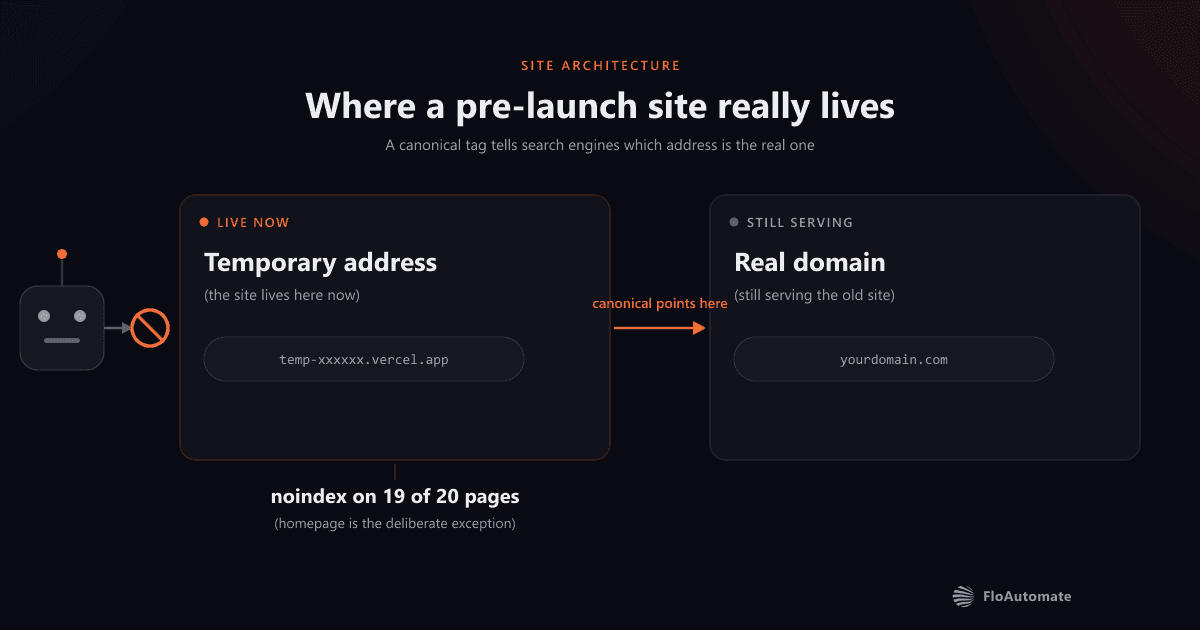
A site under construction has to live somewhere, and that is almost never its final address. It sits on a temporary domain from the host while the real domain carries on serving the old site.
Now let Google index that temporary address. Every page on it carries a canonical pointing at the future domain, because that is where it is going. So Google holds two versions of one business: a temporary address insisting a different URL is authoritative, and that real URL serving something older and completely different.
That is the duplicate content problem a staging site creates, and most write-ups get the consequence wrong. Google does not issue a penalty. The wrong URL can end up ranking, the right one gets discounted, and it clears at Google's pace rather than yours.
How I stop Google indexing a staging site
A recent client build is the worked example, and the figures are exact because an audit verified them. Twenty pages, live on a temporary address for weeks before the domain moved.
Each sub-page carries one line in its head: <meta name="robots" content="noindex">. That is the entire mechanism. No plugin, no setting buried in a dashboard.
Setting noindex before launch is the easy half. The canonicals are the half people get wrong. A canonical tag pointing to another domain sounds alarming, and on a live site it would be. On a pre-launch build it is correct: it tells any search engine that stumbles on the temporary address which URL is meant to be authoritative.
Why the homepage is the exception
Be exact here, because it is the detail a technical reader will check. I do not noindex the whole site. The homepage stays indexable with its canonical on the real domain, and the nineteen sub-pages are noindexed.
One indexable page aimed at the future domain gives Google a clean signal about where the business is heading, without putting nineteen pages into the index at an address they are about to leave. A judgement with a trade-off, not a rule.
Robots.txt is the wrong tool for this
This is the mistake I see most, and it does real damage precisely because it looks like it worked. Blocking a site in robots.txt stops crawlers fetching it. It does not stop them listing it. Google's Introduction to robots.txt is blunt: robots.txt "is not a mechanism for keeping a web page out of Google", and a disallowed URL can still be indexed and shown, just without a snippet.
The trap closes when a page is already indexed and you then disallow it. Google can no longer fetch it, so it never sees the noindex tag you just added, and the listing can sit there.
The website launch day checklist
The sequence matters as much as the steps. A fair share of what a website audit finds on a site that looks fine is launch day work nobody verified. The ordered list from that build's cutover document:
- Switch the contact forms onto the client's real inboxes, then send one labelled test through the live form and confirm it lands. Until then every enquiry is held on my side.
- Settle www against the bare domain. Add both to the host, set one as primary, and the host redirects the other. Decide before DNS moves, because it dictates what the canonicals and sitemap say.
- Point DNS at the host, and leave the mail records alone. A domain move that silently kills a client's email is the classic own goal.
- Verify on the production domain: the domain redirect, legacy URL redirects, robots.txt, the sitemap.
- Update the inbound links you control: Google Business Profile, directory profiles, social page links.
- Lift noindex. On its own. Last.
Same list I worked through on a dental practice website, from build to live, written down before launch day rather than remembered during it.
Lifting noindex is a decision, not a side effect
How to remove noindex after launch is a two-word answer technically, delete the tag, and a longer one in practice, because two questions come first.
Which pages should stay hidden? Seven thin district pages and an empty articles section keep their noindex after cutover, until real content exists. Publishing eight near-identical shells is worse than publishing nothing.
And is the content finished? A pricing page still showing placeholder figures must not become indexable. The first version Google sees is the one it forms a view about.
What to ask whoever is building your site
You do not need to understand any of this to check it is being handled. Three questions do it:
- Is the preview site visible to Google right now, and how do you know?
- Where do the canonical tags point: at the preview address, or at my real domain?
- What is the ordered list for launch day, and which step lifts noindex?
Straight answers to all three mean someone has thought about it. Launches rarely fail loudly. They fail quietly, weeks later, when the wrong URL is the one ranking.
For the record, this is my practice for how to stop Google indexing a staging site, informed by Google's documentation but not a Google recommendation. If you would rather someone else carried the checklist, this is how I build and launch custom websites and software.
Written by Zahir Ibrahim, FloAutomate, who builds custom software and websites for service businesses from Ainsdale, Southport, Merseyside.